

A few years ago, creating a polished image meant opening complicated design software. Today, it might mean typing a sentence.
Nano Banana Pro is part of a new wave of AI image generation tools powered by Google and Gemini technology. With just a prompt, users can generate images, adjust aspect ratio, enhance photos, and create high resolution visuals in seconds.
But what exactly is Nano Banana Pro? How does it work? And most importantly, is it safe for kids?
Let’s break it down in a way that makes sense, even if you are not an AI expert.
What is Nano Banana Pro?
Nano Banana Pro is not a physical product or standalone app. It is an AI image generation and editing model that operates within Google Gemini. In other words, it functions as part of a larger AI model system rather than as a separate website or extension.
It is designed to create an image from text prompts, enhance uploaded photos, and generate high resolution visuals that look polished and realistic.
AI image generation is not a small niche trend. Since 2022, over 15 billion AI-generated images have been created, highlighting just how quickly these tools are becoming part of everyday creative workflows.
Under the hood, Nano Banana Pro draws on advanced AI model technology similar to Gemini 3 Pro image tools and Gemini 2.5 Flash image capabilities. That means it can produce 4K resolution outputs, adjust aspect ratio settings, and even interpret real-world knowledge through search grounding.
Search grounding helps the system pull in accurate, up-to-date context when generating images. For example, if a user asks it to create an image of a city’s current skyline or a trending fashion style, the AI model can draw on real-world knowledge to make the result more believable.
Nano Banana Pro also supports:
- Uploading an image for editing.
- Using reference images to guide style.
- Adjusting camera angle.
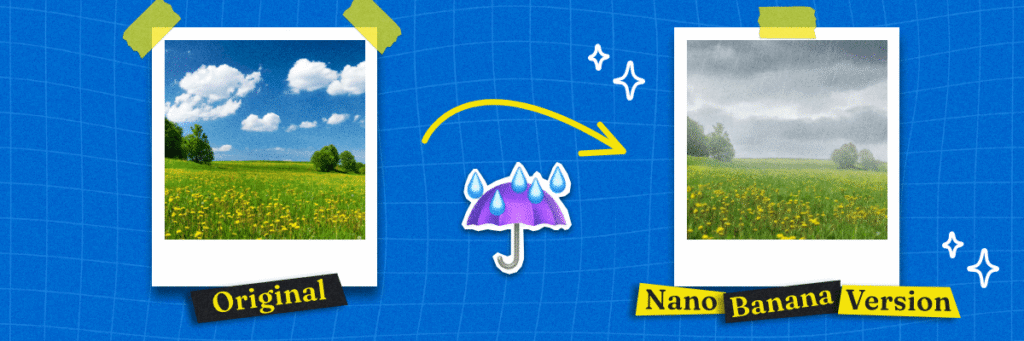
- Changing lighting from day to night.
- Rendering accurate text within images.
- Creating social media graphics in high resolution.
In short, it is an image generation and editing model built for flexibility. Whether someone wants to generate product mockups, profile pictures, or creative art, Nano Banana Pro aims to make generating images fast and visually impressive.
How to use Nano Banana Pro
Using Nano Banana Pro typically follows a few basic steps inside a Google Gemini environment.
First, you enter a prompt describing what you want. For example, “Create an image of a modern kitchen in 4K resolution with warm lighting.” The AI image generation system then processes that prompt using its AI model.
Second, you can adjust the aspect ratio. This matters for social media, since a square post, vertical story, or horizontal banner all require different dimensions.
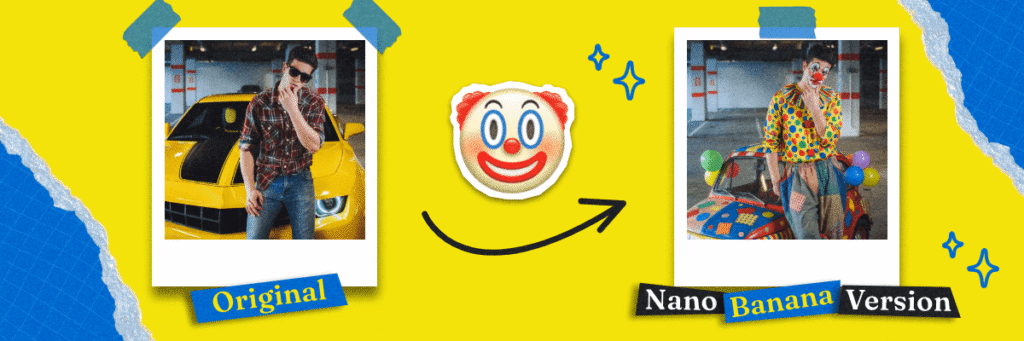
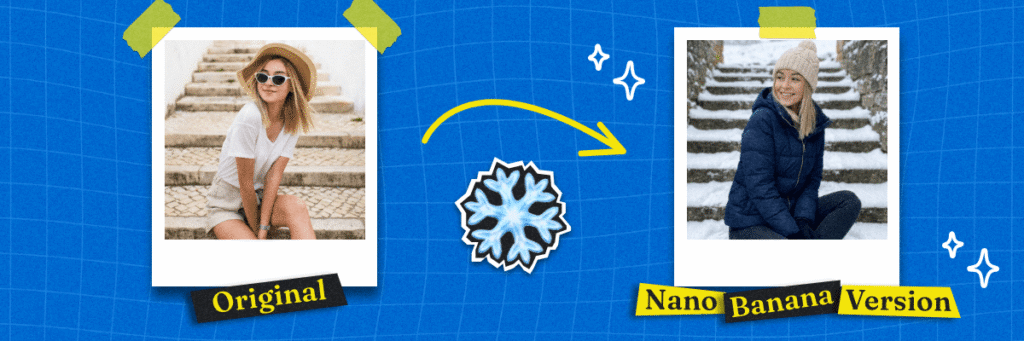
Third, you can upload an image you already have and experiment with edits. You might adjust the camera angle, change lighting from day to night, or refine small details until it feels polished.
Fourth, you can add reference images. These help the system understand style, color palette, or composition. This is especially useful when creating with Nano Banana Pro and Gemini 3 Pro image tools for consistent branding.
Finally, users can refine details. The system aims to render readable and realistic text inside images, which is helpful for social media graphics or digital posters. Because it integrates search grounding and real world knowledge, which can help create more context-aware visuals.
How much is Nano Banana Pro?
Pricing for Nano Banana Pro may depend on how it is accessed. Many advanced AI image generation tools are tied to Google Gemini subscription tiers.
For example, Gemini 3 Pro image capabilities and Gemini 2.5 Flash image tools are often part of broader AI model plans. Some features may be available in free trials, while higher resolution outputs or extended usage limits could require a paid plan.
Since pricing structures can change, it is important to check the official Google Gemini documentation for current details.
Is Nano Banana Pro safe for kids?
This is where parents should pause and take a closer look.
Nano Banana Pro is powerful. It can generate realistic images in high resolution, adjust camera angle, and render accurate text that looks convincing. While those features are impressive, they also come with risks.
AI image generation tools can produce content that looks real but is completely fabricated. For kids and teens who are still developing critical thinking skills, this can blur the line between reality and fiction. Learning how to tell if something is AI-generated is an important digital literacy skill.
Common Sense Media reports that approximately 70% of teens have used generative AI tools, and many have done so without their parents’ knowledge. That means this isn’t just a theoretical concern. Many families are already navigating it.
There are a few concerns parents should consider:
- Inappropriate content generation
- Exposure to misleading visuals
- Creation of realistic fake images
- Social media misuse
- Overreliance on AI model tools for schoolwork
Even though search grounding and real world knowledge can improve accuracy, no AI model is perfect. It may still produce errors or misleading visuals.
If your child is using tools like Nano Banana Pro inside Google Gemini, it is helpful to have open conversations about digital responsibility. Talk about how AI image generation works. Discuss why accurate text and high resolution visuals do not automatically mean something is true.
You can also consider using a safer phone for kids designed to limit risky features while still allowing connection.
What are the pros and cons of Nano Banana Pro?
Like most AI tools, Nano Banana Pro has strengths and limitations.
Pros:
- High-quality, professional-looking visuals
- Flexible aspect ratios for different platforms
- Built-in image generation and editing model
- Real-world context through search grounding
- Useful for social media and digital content
- Encourages creative experimentation
- Fast idea prototyping
- Saves time compared to manual graphic design
- Accessible for students and small businesses
- Continually improving AI performance
Cons:
- Requires Google Gemini subscription
- AI outputs are not always accurate
- Can generate realistic fake images
- Not designed specifically for kids
- Learning curve for best results
- Results depend on prompt quality
- Access varies by subscription tier
- Raises ethical questions around originality and authenticity
Understanding both sides helps families make informed decisions.
Making Informed Decisions About AI Image Tools
Nano Banana Pro is a powerful AI image generation tool built on Google Gemini technology. With features like 4K resolution, flexible aspect ratio settings, search grounding, reference images, and the ability to upload an image for editing, it offers advanced capabilities for generating images and creating polished visuals.
At the same time, tools like this raise important questions about digital literacy and safety. As AI image generation becomes more common on social media and in everyday apps, parents and teens need to understand how these systems work.
Technology can be creative and fun, but it can also be confusing and misleading.
Staying informed doesn’t mean fearing new technology; it simply means understanding it. When parents know how tools like Nano Banana Pro work, they can guide their kids with confidence instead of confusion.
And if you’d rather start with a phone built specifically for kids, Gabb offers phones designed to support connection without so many added risks.
Have you talked with your child about AI image generation tools? How is your family navigating AI tools? We’d love to hear your perspective. Share your thoughts in the comments below!

Success!
Your comment has been submitted for review! We will notify you when it has been approved and posted!
Thank you!